
Working with RAG in MLRun#
Overview of RAG application and strategy#
Retrieval Augmented Generation (RAG) is a common strategy for extending the knowledge of pre-trained LLMs. It gives the LLM a corpus of knowledge to draw from when answering questions about topics or information that were not in the original training set.
Steps in RAG#
Ingest and Index: Data is split into chunks and indexed into a vector store using an embeddings model.
Retrieve Relevant Data:The input query from the user is then used to search for relevent chunks of data using semantic similarity search (for example, which chunks are most similar to the desired question or topic). Additionally, the input query to the vector store can be revised, modified, or enhanced, using additional context to ensure that the returned chunks are more relevant.
Format Prompt:The returned chunks of data from the vector store are formatted and inserted into the prompt for the LLM.
Model Inference:The LLM is invoked with the user's question, relevant chunks of data, and additional information such as conversation history.
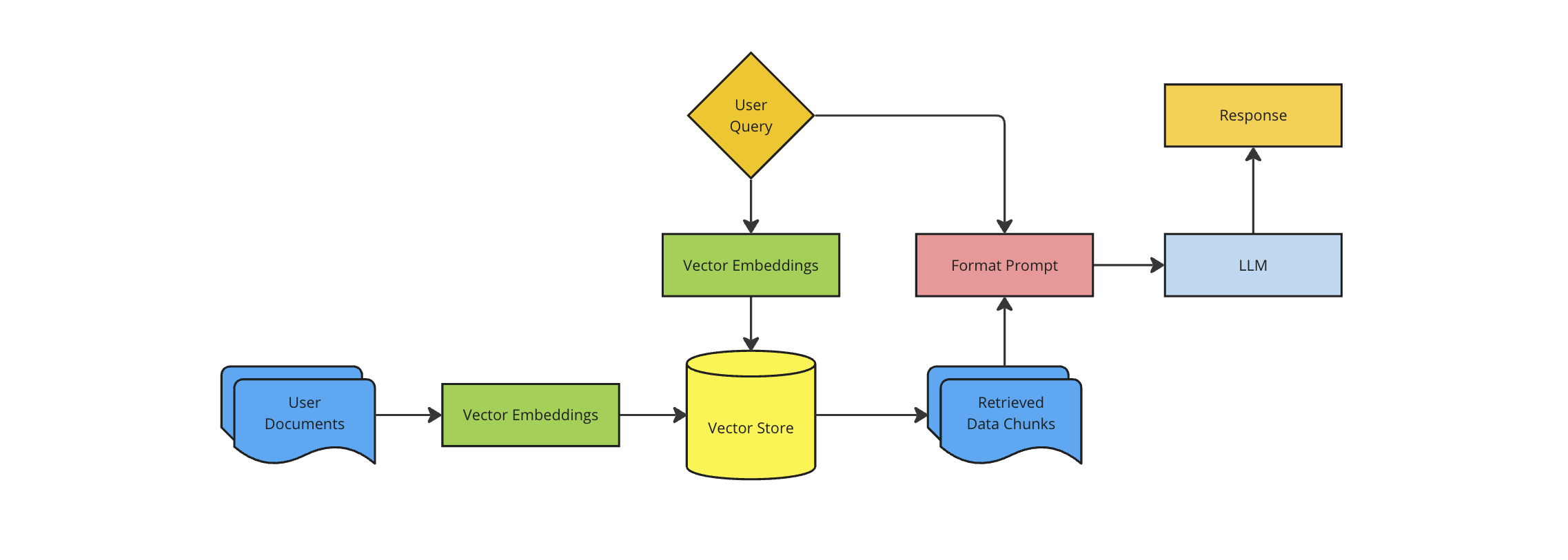
Most important parts of RAG architecture#
There are a number of open source and proprietary embeddings models, LLMs, and vector stores.
Vector Store: Used to store the embedded documents in a format that allows for semantic search and retrieval.
This demo uses Milvus — an open-source vector database designed specifically for similarity search on massive datasets of high-dimensional vectors.
Embeddings Model: Used to embed the documents as well as embedding new user queries for semantic search.
The Hugging Face Massive Text Embedding Benchmark (MTEB) Leaderboard is a great place to start when considering an open source embeddings model.
This demo uses either OpenAI's text-embedding-3-small or Hugging Face's all-MiniLM-L6-v2.
LLM: used for generating responses.
The Hugging Face Open LLM Leaderboard is a great place to start when considering an open source LLM.
This demo uses either OpenAI's gpt-3.5-turbo-0125 or Ollama's Llama3. Additional examples using Hugging Face models will be coming in the future.
Prerequisite#
# %pip install langchain langchain_community langchain_openai pymilvus langchain_huggingface "protobuf<3.20"
Install a vector DB and dependencies#
As mentioned above, this demo uses Milvus -— an open-source vector database designed specifically for similarity search on massive datasets of high-dimensional vectors. It can be installed via docker-compose or Kubernetes depending on your MLRun installation method. In this demo, Milvus has been installed in our K8s cluster and the service is available at http://milvus.default.svc.cluster.local:19530.
Additionally, if you are using Ollama, it can be installed on your local machine or Kubernetes depending on your MLRun installation method. In this example, Ollama is already installed and the service is available at http://ollama.default.svc.cluster.local:11434.
Setup#
import os

import mlrun
from langchain.vectorstores import Milvus
from langchain_community.chat_models import ChatOllama
from langchain_community.document_loaders import WebBaseLoader
from langchain_core.output_parsers import StrOutputParser
from langchain_core.runnables import RunnablePassthrough

# from langchain_huggingface.embeddings import HuggingFaceEmbeddings
from langchain_openai import ChatOpenAI, OpenAIEmbeddings
from langchain_core.prompts import PromptTemplate
from langchain_text_splitters import RecursiveCharacterTextSplitter
import pandas as pd
from mlrun.utils import create_class

# OpenAI
OPENAI_BASE_URL = ""
OPENAI_API_KEY = ""
os.environ["OPENAI_API_KEY"] = OPENAI_API_KEY
os.environ["OPENAI_BASE_URL"] = OPENAI_BASE_URL
OPENAI_MODEL = "gpt-3.5-turbo-0125"

# Ollama
OLLAMA_URL = "https://rag-test.default-tenant.app.llm-3-6-0.iguazio-cd1.com/"
OLLAMA_MODEL = "llama3.2"

# Embeddings
EMBEDDINGS_MODEL = "all-MiniLM-L6-v2"

# Milvus dev deployment using helm:
# helm install my-milvus milvus/milvus --set cluster.enabled=false --set standalone.persistence.enabled=false --set etcd.replicaCount=1 --set minio.mode=standalone --set pulsar.enabled=false --set minio.persistence.enabled=false --set etcd.persistence.enabled=false

# Milvus
MILVUS_CONNECTION_ARGS = {
    "host": "my-milvus.default.svc.cluster.local",
    "port": "19530",
}

PROMPT_TEMPLATE = """Use the following pieces of context to answer the question at the end.
If you don't know the answer, just say that you don't know, don't try to make up an answer.
Use three sentences maximum and keep the answer as concise as possible.
Always say "thanks for asking!" at the end of the answer.

{context}

Question: {question}

Helpful Answer:"""
USER_AGENT environment variable not set, consider setting it to identify your requests.
import mlrun

project = mlrun.get_or_create_project("rag")
Select OpenAI or Ollama#
MODE = "openai"  # also supports ollama

if MODE == "openai":
    embeddings_class = "langchain_openai.embeddings.OpenAIEmbeddings"
    embeddings_kwargs = {"model": "text-embedding-3-small"}
    llm_class = "langchain_openai.chat_models.ChatOpenAI"
    llm_kwargs = {"model": OPENAI_MODEL}

elif MODE == "ollama":
    from mlrun.common.schemas.api_gateway import APIGatewayAuthenticationMode

    llama_func = project.set_function(
        name="llama32", kind="application", image="gcr.io/iguazio/ollama:3.2"
    )
    llama_func.set_internal_application_port(port=11434)
    llama_func.with_limits(gpus=1)
    llama_func.set_image_pull_configuration(image_pull_policy="Always")
    project.deploy_function(function="llama32")
    llama_func.create_api_gateway(
        name="test", authentication_mode=APIGatewayAuthenticationMode.none
    )

    # embeddings_class = "langchain_huggingface.embeddings.HuggingFaceEmbeddings"
    # embeddings_kwargs = {"model_name": EMBEDDINGS_MODEL}
    embeddings_class = "langchain_openai.embeddings.OpenAIEmbeddings"
    embeddings_kwargs = {"model": "text-embedding-3-small"}

    llm_class = "langchain_community.chat_models.ChatOllama"
    llm_kwargs = {"model": OLLAMA_MODEL, "base_url": OLLAMA_URL}

else:
    raise ValueError(f"Mode {MODE} not supported")

print(f"Using mode: {MODE.upper()}\n")
print(f"Embeddings model: {embeddings_class}\n")
print(f"LLM model: {llm_class}")
Using mode: OPENAI

Embeddings model: langchain_openai.embeddings.OpenAIEmbeddings

LLM model: langchain_openai.chat_models.ChatOpenAI
Create a data indexing function#
%%writefile index_data_new.py
import mlrun
from mlrun.utils import create_class
import pandas as pd
from langchain_community.vectorstores import Milvus
from langchain_community.document_loaders import WebBaseLoader
from langchain_text_splitters import RecursiveCharacterTextSplitter
import uuid

@mlrun.handler()
def index_urls(
    data: pd.DataFrame,
    url_column: str,
    embeddings_class: str,
    embeddings_kwargs: dict,
    milvus_host: str,
    milvus_port: int,
    chunk_size: int,
    chunk_overlap: int,
):

    spec = mlrun.artifacts.DocumentLoaderSpec(loader_class_name="langchain_community.document_loaders.WebBaseLoader",
                                              src_name="web_path",
                                              download_object =False)

    # Split documents
    text_splitter = RecursiveCharacterTextSplitter(
            chunk_size=chunk_size,
            chunk_overlap=chunk_overlap
        )

    project = mlrun.get_current_project()


    # Load embeddings and LLM models
    embeddings = create_class(embeddings_class)(**embeddings_kwargs)

    # Load vector store
    vector_db = Milvus(
        embedding_function=embeddings,
        connection_args={
            "host": milvus_host,
            "port": str(milvus_port),
        },
        auto_id=True
    )

    # Create MLRun collection wrapper
    collection = project.get_vector_store_collection(vector_store=vector_db)

    # Get input URLs
    urls = set(data[url_column].values)

    for doc in urls:

        artifact_key = mlrun.artifacts.DocumentArtifact.key_from_source(doc)

        artifact = project.log_document(key=artifact_key,
                                        target_path=doc,
                                        document_loader_spec=spec)

        milvus_ids = collection.add_artifacts([artifact], splitter=text_splitter)

        print("Documents added with IDs:", milvus_ids)
Overwriting index_data_new.py
Index the dataset in the vector store#
index_fn = project.set_function(
    name="index",
    func="index_data_new.py",
    kind="job",
    image="mlrun/mlrun",
    handler="index_urls",
)

# Only relevant for OpenAI
index_fn.set_envs(
    {"OPENAI_API_KEY": OPENAI_API_KEY, "OPENAI_BASE_URL": OPENAI_BASE_URL}
)
<mlrun.runtimes.kubejob.KubejobRuntime at 0x7f92f8670a30>
data = pd.DataFrame(
    [
        {"url": "https://docs.mlrun.org/en/latest/index.html"},
        {"url": "https://docs.mlrun.org/en/latest/cheat-sheet.html"},
        {"url": "https://docs.mlrun.org/en/latest/tutorials/01-mlrun-basics.html"},
    ]
)
data
| url | |
|---|---|
| 0 | https://docs.mlrun.org/en/latest/index.html |
| 1 | https://docs.mlrun.org/en/latest/cheat-sheet.html |
| 2 | https://docs.mlrun.org/en/latest/tutorials/01-... |
dataset_artifact = project.log_dataset(key="to-index", df=data)
dataset_artifact.uri
'store://datasets/rag/to-index#0@608179dd-88fa-4f22-9bf0-182c05487094^e91e1fcb0d50e5dcbfd27636132648929c5fb20a'
project.run_function(
    index_fn,
    inputs={"data": dataset_artifact.uri},
    params={
        "url_column": "url",
        "embeddings_class": embeddings_class,
        "embeddings_kwargs": embeddings_kwargs,
        "milvus_host": MILVUS_CONNECTION_ARGS["host"],
        "milvus_port": MILVUS_CONNECTION_ARGS["port"],
        "chunk_size": 2000,
        "chunk_overlap": 200,
    },
    local=True,
)
> 2025-01-21 06:58:25,118 [info] Storing function: {"db":"http://mlrun-api:8080","name":"index-index-urls","uid":"9c105c7feafb4fb6b60ac7c49c11fbe2"}
Documents added with IDs: [454873324101293747, 454873324101293748, 454873324101293749, 454873324101293750, 454873324101293751, 454873324101293752, 454873324101293753, 454873324101293754, 454873324101293755, 454873324101293756]
Documents added with IDs: [454873324101293758, 454873324101293759, 454873324101293760, 454873324101293761, 454873324101293762, 454873324101293763, 454873324101293764, 454873324101293765, 454873324101293766, 454873324101293767, 454873324101293768, 454873324101293769, 454873324101293770]
Documents added with IDs: [454873324101293772, 454873324101293773, 454873324101293774, 454873324101293775, 454873324101293776, 454873324101293777, 454873324101293778, 454873324101293779, 454873324101293780, 454873324101293781, 454873324101293782, 454873324101293783, 454873324101293784, 454873324101293785, 454873324101293786, 454873324101293787, 454873324101293788, 454873324101293789, 454873324101293790, 454873324101293791, 454873324101293792, 454873324101293793, 454873324101293794, 454873324101293795]
| project | uid | iter | start | state | kind | name | labels | inputs | parameters | results |
|---|---|---|---|---|---|---|---|---|---|---|
| rag | 0 | Jan 21 06:58:25 | completed | run | index-index-urls | v3io_user=edmond kind=local owner=edmond host=jupyter-edmond-769c6b57f6-6xpgz |
data |
url_column=url embeddings_class=langchain_openai.embeddings.OpenAIEmbeddings embeddings_kwargs={'model': 'text-embedding-3-small'} milvus_host=my-milvus.default.svc.cluster.local milvus_port=19530 chunk_size=2000 chunk_overlap=200 |
> 2025-01-21 06:58:29,529 [info] Run execution finished: {"name":"index-index-urls","status":"completed"}
<mlrun.model.RunObject at 0x7f92175d7280>
Create a retrieval function#
%%writefile retrieval_new.py
import mlrun
import os
from mlrun.serving.v2_serving import V2ModelServer
from typing import Dict, Any, Union
from langchain_core.language_models.llms import LLM
import langchain_community.llms
from mlrun.utils import create_class
from langchain_community.vectorstores import Milvus

class QueryMilvus:
    def __init__(
        self,
        project: str,
        embeddings_class: str,
        embeddings_kwargs: dict,
        milvus_connection_args: dict,
        num_documents: int = 3,
    ):
        self.project = mlrun.get_or_create_project(project, "./")
        self.embeddings_class = embeddings_class
        self.embeddings_kwargs = embeddings_kwargs
        self.embeddings = create_class(self.embeddings_class)(**self.embeddings_kwargs)
        self.milvus_connection_args = milvus_connection_args
        self.vector_db = Milvus(
            embedding_function=self.embeddings,
            connection_args=self.milvus_connection_args,
            auto_id=True
        )
        self.collection = self.project.get_vector_store_collection(vector_store=self.vector_db)
        self.num_documents = num_documents

    def do(self, event: dict):
        question = event["question"]
        num_documents = event.get("num_documents", self.num_documents)
        docs = self.collection.similarity_search(question, k=self.num_documents)
        event["context"] = "\n\n".join(doc.page_content for doc in docs)
        event["sources"] = list({doc.metadata["source"] for doc in docs})
        return event


class FormatPrompt:
    def __init__(self, prompt: str):
        self.prompt = prompt

    def do(self, event:dict):
        formatted_prompt = self.prompt.format(**event)
        event["inputs"] = [formatted_prompt]
        return event


class LangChainModelServer(mlrun.serving.V2ModelServer):
    def __init__(
        self,
        context: mlrun.MLClientCtx = None,
        model_class: str = None,
        llm: Union[str, LLM] = None,
        init_kwargs: Dict[str, Any] = None,
        generation_kwargs: Dict[str, Any] = None,
        name: str = None,
        model_path: str = None,
        **kwargs,
    ):
        """
        Initialize a serving class for general llm usage.
        :param model_class:      The class of the model to use.
        :param llm:              The name of specific llm to use, or the llm object itself in case of local usage.
        :param init_kwargs:      The initialization arguments to use while initializing the llm.
        :param generation_kwargs: The generation arguments to use while generating text.
        """
        super().__init__(
            name=name,
            context=context,
            model_path=model_path
        )
        self.model_class = model_class
        self.llm = llm
        self.init_kwargs = init_kwargs or {}
        self.generation_kwargs = generation_kwargs

    def load(self):
        # If the llm is already an LLM object, use it directly
        if isinstance(self.llm, LLM):
            self.model = self.llm
            return
        # If the llm is a string (or not given, then we take default model), load the llm from langchain.
        self.model = create_class(self.model_class)(**self.init_kwargs)

    def predict(self, request: Dict[str, Any], generation_kwargs: Dict[str, Any] = None):

        access_key = os.environ["V3IO_ACCESS_KEY"]
        headers = {"Cookie": 'session=j:{"sid": "' + access_key + '"}'}
        inputs = request.get("inputs", [])
        generation_kwargs = generation_kwargs or self.generation_kwargs

        print(headers)

        return self.model.invoke(input=inputs[0],
                                 config=generation_kwargs,
                                 headers=headers).dict()
Overwriting retrieval_new.py
rag_fn = project.set_function(
    name="rag",
    func="retrieval_new.py",
    kind="serving",
    image="gcr.io/iguazio/rag-deploy:1.0",
)

rag_fn.set_envs({"OPENAI_API_KEY": OPENAI_API_KEY, "OPENAI_BASE_URL": OPENAI_BASE_URL})
graph = rag_fn.set_topology("flow", engine="async")

graph.add_step(
    class_name="QueryMilvus",
    project=project.name,
    embeddings_class=embeddings_class,
    embeddings_kwargs=embeddings_kwargs,
    milvus_connection_args=MILVUS_CONNECTION_ARGS,
)
graph.add_step(class_name="FormatPrompt", prompt=PROMPT_TEMPLATE, after="$prev")

router = graph.add_step(
    "*mlrun.serving.ModelRouter",
    name="ModelRouter",
    after="$prev",
    result_path="prediction",
).respond()
router.add_route(
    key="LangChainModelServer",
    class_name="LangChainModelServer",
    model_class=llm_class,
    init_kwargs=llm_kwargs,
    result_path="output",
    after="$prev",
)
graph.plot(rankdir="LR")

Test locally#
%%time
mock = rag_fn.to_mock_server()
resp = mock.test(
    path="/",
    body={"question": "Give me a python example of how to deploy a serving function"},
)
> 2024-12-29 10:07:45,136 [info] Project loaded successfully: {"project_name":"rag"}
> 2024-12-29 10:07:45,188 [info] model LangChainModelServer was loaded
> 2024-12-29 10:07:45,189 [info] Loaded ['LangChainModelServer']
{'Cookie': 'session=j:{"sid": "56167b0d-de03-4ba1-bc58-b9adf9d6a47b"}'}
CPU times: user 118 ms, sys: 49.8 ms, total: 168 ms
Wall time: 4.39 s
print(resp["prediction"]["outputs"]["content"])
Here is an example of how to deploy a serving function in Python:

```python
import mlrun

# Define the serving function
def main():
    # Create a project and set up the serving topology
    project = mlrun.serving.start_project()
    serving_fn = project.set_function(
        func="",
        name="serving",
        image="mlrun/mlrun",
        kind="serving",
        requirements=["scikit-learn~=1.5.1"],
    )

    # Add a model to the serving function
    serving_fn.add_model(
        "cancer-classifier",
        model_path="path/to/model",
        class_name="mlrun.frameworks.sklearn.SklearnModelServer",
    )

    # Create a mock server and test the endpoint
    server = serving_fn.to_mock_server()
    server.test("/v2/models/", method="GET")
```

Thanks for asking!
print(resp["question"])
Give me a python example of how to deploy a serving function
print(resp["sources"])
['rag/2e588a01b0dc4806bf2b8592a047b0f2', 'rag/dad80a1867c74cf4aef40e3866362d71', 'rag/539a329744374d908bee3eb3d83ff8b8']
# Formatted prompt - long output
# print(resp["inputs"][0])
Deploy to an endpoint#
project.deploy_function(rag_fn)
> 2024-12-29 10:08:05,916 [info] Starting remote function deploy
2024-12-29 10:08:06  (info) Deploying function
2024-12-29 10:08:06  (info) Building
2024-12-29 10:08:06  (info) Staging files and preparing base images
2024-12-29 10:08:06  (warn) Using user provided base image, runtime interpreter version is provided by the base image
2024-12-29 10:08:06  (info) Building processor image
2024-12-29 10:11:11  (info) Build complete
2024-12-29 10:11:57  (info) Function deploy complete
> 2024-12-29 10:11:57,982 [info] Successfully deployed function: {"external_invocation_urls":["rag-rag.default-tenant.app.llm-3-6-0.iguazio-cd1.com/"],"internal_invocation_urls":["nuclio-rag-rag.default-tenant.svc.cluster.local:8080"]}
DeployStatus(state=ready, outputs={'endpoint': 'http://rag-rag.default-tenant.app.llm-3-6-0.iguazio-cd1.com/', 'name': 'rag-rag'})
%%time
resp2 = rag_fn.invoke(path="/", body={"question": "What is MLRun?"})
> 2024-12-29 10:12:05,853 [info] Invoking function: {"method":"POST","path":"http://nuclio-rag-rag.default-tenant.svc.cluster.local:8080/"}
CPU times: user 9 ms, sys: 90 µs, total: 9.09 ms
Wall time: 1.84 s
print(resp2["prediction"]["outputs"]["content"])
MLRun is an open-source Python framework for managing the lifecycle of machine learning models and applications. It provides a unified way to deploy, manage, and monitor machine learning models across different environments.

Thanks for asking!