
Train, compare, and register models#
This notebook provides a quick overview of training, comparing, and registering ML models using MLRun AI orchestration framework.
Make sure you reviewed the basics in MLRun Quick Start Tutorial.
In this tutorial
MLRun installation and configuration#
Before running this notebook make sure mlrun and sklearn packages are installed (pip install mlrun scikit-learn~=1.5.2) and that you have configured the access to the MLRun service.
# Install MLRun if not installed, run this only once (restart the notebook after the install !!!)
%pip install mlrun
Define MLRun project and a training functions#
You should create, load, or use (get) an MLRun project that holds all your functions and assets.
Get or create a new project
The get_or_create_project() method tries to load the project from MLRun DB. If the project does not exist, it creates a new one.
import mlrun
project = mlrun.get_or_create_project(
"tutorial", context="./", user_project=True, allow_cross_project=True
)
Add (auto) MLOps to your training function
Training functions generate models and various model statistics. You'll want to store the models along with all the relevant data,
metadata, and measurements. MLRun can apply all the MLOps functionality automatically ("Auto-MLOps") by simply using the framework-specific apply_mlrun() method.
This is the line to add to your code, as shown in the training function below.
apply_mlrun(model=model, model_name="my_model", x_test=x_test, y_test=y_test)
apply_mlrun() manages the training process and automatically logs all the framework-specific model object, details, data, metadata, and metrics.
It accepts the model object and various optional parameters. When specifying the x_test and y_test data it generates various plots and calculations to evaluate the model.
Metadata and parameters are automatically recorded (from MLRun context object) and therefore don't need to be specified.
Function code
Run the following cell to generate the trainer.py file (or copy it manually):
%%writefile src/trainer.py
import pandas as pd
from sklearn import ensemble
from sklearn.model_selection import train_test_split
from mlrun.frameworks.sklearn import apply_mlrun
def train(
dataset: pd.DataFrame,
label_column: str = "label",
n_estimators: int = 100,
learning_rate: float = 0.1,
max_depth: int = 3,
model_name: str = "cancer_classifier",
):
# Initialize the x & y data
x = dataset.drop(label_column, axis=1)
y = dataset[label_column]
# Train/Test split the dataset
x_train, x_test, y_train, y_test = train_test_split(
x, y, test_size=0.2, random_state=42
)
# Pick an ideal ML model
model = ensemble.GradientBoostingClassifier(
n_estimators=n_estimators, learning_rate=learning_rate, max_depth=max_depth
)
# -------------------- The only line you need to add for MLOps -------------------------
# Wraps the model with MLOps (test set is provided for analysis & accuracy measurements)
apply_mlrun(model=model, model_name=model_name, x_test=x_test, y_test=y_test)
# --------------------------------------------------------------------------------------
# Train the model
model.fit(x_train, y_train)
Overwriting src/trainer.py
Create a serverless function object from the code above, and register it in the project
trainer = project.set_function(
"src/trainer.py", name="trainer", kind="job", image="mlrun/mlrun", handler="train"
)
Run the training function and log the artifacts and model#
Create a dataset for training
import pandas as pd
from sklearn.datasets import load_breast_cancer
breast_cancer = load_breast_cancer()
breast_cancer_dataset = pd.DataFrame(
data=breast_cancer.data, columns=breast_cancer.feature_names
)
breast_cancer_labels = pd.DataFrame(data=breast_cancer.target, columns=["label"])
breast_cancer_dataset = pd.concat([breast_cancer_dataset, breast_cancer_labels], axis=1)
breast_cancer_dataset.to_csv("cancer-dataset.csv", index=False)
Run the function (locally) using the generated dataset
trainer_run = project.run_function(
"trainer",
inputs={"dataset": "cancer-dataset.csv"},
params={"n_estimators": 100, "learning_rate": 1e-1, "max_depth": 3},
local=True,
)
> 2025-05-16 11:46:21,517 [info] Storing function: {"db":"http://mlrun-api:8080","name":"trainer-train","uid":"3afd9fd72c334a1a9599e06475580662"}
| project | uid | iter | start | end | state | kind | name | labels | inputs | parameters | results | artifact_uris |
|---|---|---|---|---|---|---|---|---|---|---|---|---|
| tutorial-iguazio | 0 | May 16 11:46:21 | NaT | completed | run | trainer-train | v3io_user=shapira kind=local owner=shapira host=jupyter-shapira-665ddf954b-jscr6 |
dataset |
n_estimators=100 learning_rate=0.1 max_depth=3 |
accuracy=0.956140350877193 f1_score=0.965034965034965 precision_score=0.9583333333333334 recall_score=0.971830985915493 |
feature-importance=store://artifacts/tutorial-iguazio/trainer-train_feature-importance#0@3afd9fd72c334a1a9599e06475580662^2af1623ce201af283cd9c126bab4a1393e897a93 test_set=store://datasets/tutorial-iguazio/trainer-train_test_set#0@3afd9fd72c334a1a9599e06475580662^316eff7b1e9f39b97d839e78074b2be6280b35d4 confusion-matrix=store://artifacts/tutorial-iguazio/trainer-train_confusion-matrix#0@3afd9fd72c334a1a9599e06475580662^c9b3467a38fdf00c62261018e18fa480c1e9ae19 roc-curves=store://artifacts/tutorial-iguazio/trainer-train_roc-curves#0@3afd9fd72c334a1a9599e06475580662^70bb10754aaba2290bd1bed6d8ccba469dab7f95 calibration-curve=store://artifacts/tutorial-iguazio/trainer-train_calibration-curve#0@3afd9fd72c334a1a9599e06475580662^d8a7d94cbf7740bbda1873b1343f6ba29e85b74f model=store://models/tutorial-iguazio/cancer_classifier#0@3afd9fd72c334a1a9599e06475580662^f99b258e9e0709d4fcf327105afba2ba1d0503ec |
> 2025-05-16 11:46:27,630 [info] Run execution finished: {"name":"trainer-train","status":"completed"}
View the auto generated results and artifacts
trainer_run.outputs
{'accuracy': 0.956140350877193,
'f1_score': 0.965034965034965,
'precision_score': 0.9583333333333334,
'recall_score': 0.971830985915493,
'feature-importance': 'v3io:///projects/tutorial-iguazio/artifacts/trainer-train/0/feature-importance.html',
'test_set': 'store://datasets/tutorial-iguazio/trainer-train_test_set:latest@3afd9fd72c334a1a9599e06475580662^316eff7b1e9f39b97d839e78074b2be6280b35d4',
'confusion-matrix': 'v3io:///projects/tutorial-iguazio/artifacts/trainer-train/0/confusion-matrix.html',
'roc-curves': 'v3io:///projects/tutorial-iguazio/artifacts/trainer-train/0/roc-curves.html',
'calibration-curve': 'v3io:///projects/tutorial-iguazio/artifacts/trainer-train/0/calibration-curve.html',
'model': 'store://models/tutorial-iguazio/cancer_classifier:latest@3afd9fd72c334a1a9599e06475580662^f99b258e9e0709d4fcf327105afba2ba1d0503ec'}
trainer_run.artifact("feature-importance").show()
Export model files + metadata into a zip (requires MLRun 1.1.0 and later)
You can export() the model package (files + metadata) into a zip, and load it on a remote system/cluster by running model = project.import_artifact(key, path)).
trainer_run.artifact("model").meta.export("src/model.zip")
Hyper-parameter tuning and model/experiment comparison#
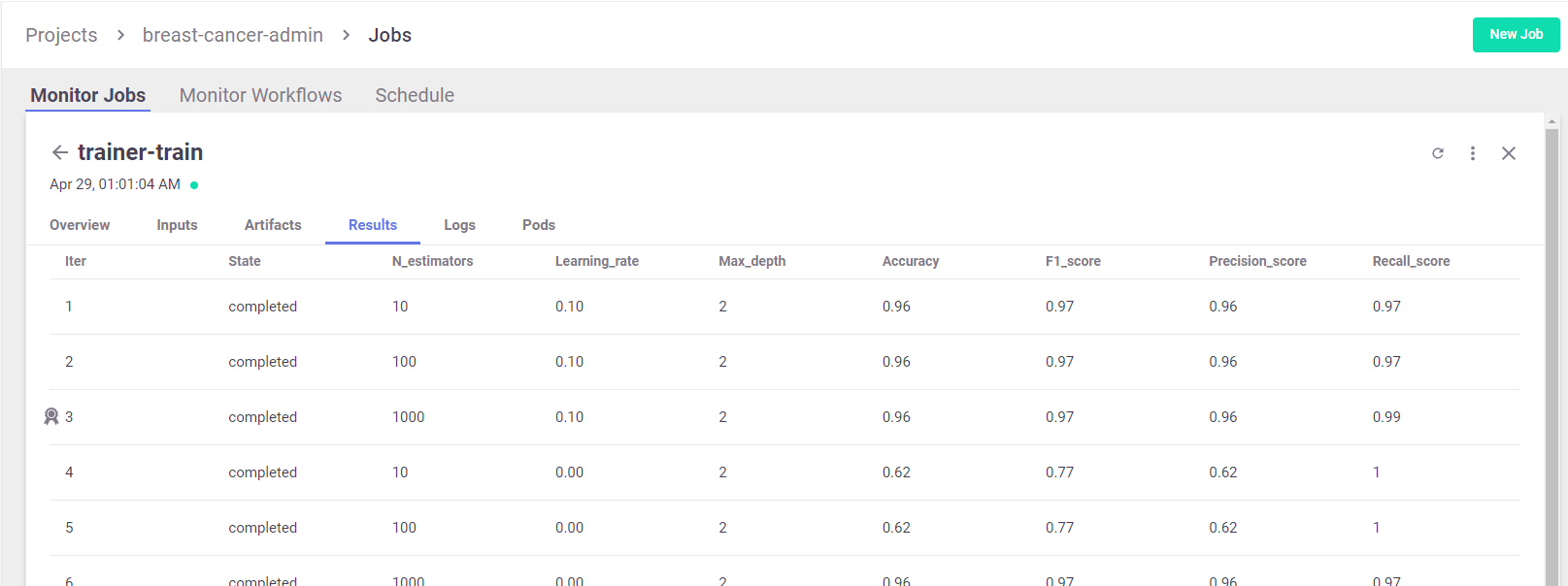
Run a GridSearch with a couple of parameters, and select the best run with respect to the max accuracy.
(For more details, see MLRun Hyper-Param and Iterative jobs.)
For basic usage you can run the hyperparameters tuning job by using the arguments:
hyperparamsfor the hyperparameters options and values of choice.selectorfor specifying how to select the best model.
Running a remote function
To run the hyper-param task over the cluster you need the input data to be available for the job, using object storage or the MLRun versioned artifact store.
The following line logs (and uploads) the dataframe as a project artifact:
dataset_artifact = project.log_dataset(
"cancer-dataset", df=breast_cancer_dataset, index=False
)
Run the function over the remote Kubernetes cluster (local is not set):
hp_tuning_run = project.run_function(
"trainer",
inputs={"dataset": dataset_artifact.uri},
hyperparams={
"n_estimators": [10, 100, 1000],
"learning_rate": [1e-1, 1e-3],
"max_depth": [2, 8],
},
selector="max.accuracy",
)
> 2025-05-16 11:46:28,347 [info] Storing function: {"db":"http://mlrun-api:8080","name":"trainer-train","uid":"899070c43f714cd9be69de98054fc70d"}
> 2025-05-16 11:46:28,576 [info] Job is running in the background, pod: trainer-train-6xpw5
> 2025-05-16 11:47:13,693 [info] Best iteration=3, used criteria max.accuracy
> 2025-05-16 11:47:14,168 [info] To track results use the CLI: {"info_cmd":"mlrun get run 899070c43f714cd9be69de98054fc70d -p tutorial-iguazio","logs_cmd":"mlrun logs 899070c43f714cd9be69de98054fc70d -p tutorial-iguazio"}
> 2025-05-16 11:47:14,168 [info] Or click for UI: {"ui_url":"https://dashboard.default-tenant.app.iguazio.com/mlprojects/tutorial-iguazio/jobs/monitor-jobs/trainer-train/899070c43f714cd9be69de98054fc70d/overview"}
> 2025-05-16 11:47:14,169 [info] Run execution finished: {"name":"trainer-train","status":"completed"}
| project | uid | iter | start | end | state | kind | name | labels | inputs | parameters | results | artifacts |
|---|---|---|---|---|---|---|---|---|---|---|---|---|
| tutorial-iguazio | 0 | May 16 11:46:35 | 2025-05-16 11:47:14.162653+00:00 | completed | run | trainer-train | v3io_user=shapira kind=job owner=shapira mlrun/client_version=1.8.0-rc45 mlrun/client_python_version=3.9.18 |
dataset |
best_iteration=3 accuracy=0.9649122807017544 f1_score=0.9722222222222222 precision_score=0.958904109589041 recall_score=0.9859154929577465 |
parallel_coordinates iteration_results model calibration-curve roc-curves confusion-matrix test_set feature-importance |
> 2025-05-16 11:47:25,863 [info] Run execution finished: {"name":"trainer-train","status":"completed"}
View Hyper-param results and the selected run in the MLRun UI
List the generated models and compare the different runs
hp_tuning_run.outputs
{'best_iteration': 3,
'accuracy': 0.9649122807017544,
'f1_score': 0.9722222222222222,
'precision_score': 0.958904109589041,
'recall_score': 0.9859154929577465,
'feature-importance': 'v3io:///projects/tutorial-iguazio/artifacts/trainer-train/3/feature-importance.html',
'test_set': 'store://datasets/tutorial-iguazio/trainer-train_test_set#3:latest@899070c43f714cd9be69de98054fc70d^e1a98a2c50485a45b2d42cfb52225e403fcaddb7',
'confusion-matrix': 'v3io:///projects/tutorial-iguazio/artifacts/trainer-train/3/confusion-matrix.html',
'roc-curves': 'v3io:///projects/tutorial-iguazio/artifacts/trainer-train/3/roc-curves.html',
'calibration-curve': 'v3io:///projects/tutorial-iguazio/artifacts/trainer-train/3/calibration-curve.html',
'model': 'store://models/tutorial-iguazio/cancer_classifier#3:latest@899070c43f714cd9be69de98054fc70d^c7ce31208ff2f694f6741d7512e0c2a3f0cac48f',
'iteration_results': 'v3io:///projects/tutorial-iguazio/artifacts/trainer-train/0/iteration_results.csv',
'parallel_coordinates': 'store://artifacts/tutorial-iguazio/trainer-train_parallel_coordinates:latest@899070c43f714cd9be69de98054fc70d^de00301bdf7377d210060c1a21565dc2cf37fc90'}
# List the models in the project (can apply filters)
models = project.list_models()
for model in models:
print(f"uri: {model.uri}, metrics: {model.metrics}")
# To view the full model object use:
# print(models[0].to_yaml())
# Compare the runs (generate interactive parallel coordinates plot and a table)
project.list_runs(name="trainer-train", iter=True).compare()
Build and test the model serving functions#
MLRun serving can produce managed, real-time, serverless, pipelines composed of various data processing and ML tasks. The pipelines use the Nuclio real-time serverless engine, which can be deployed anywhere. For more details and examples, see the MLRun Serving Graphs.
Create a model serving function from your code, and (view it here)
serving_fn = project.set_function(
func="",
name="serving",
image="mlrun/mlrun",
kind="serving",
)
serving_fn.add_model(
"cancer-classifier",
model_path=hp_tuning_run.outputs["model"],
class_name="mlrun.frameworks.sklearn.SKLearnModelServer",
)
> 2025-05-16 11:47:27,911 [info] Function code not specified, setting entry point to image
<mlrun.serving.states.TaskStep at 0x7fb460c7f3d0>
# Create a mock (simulator of the real-time function)
server = serving_fn.to_mock_server()
my_data = {
"inputs": [
[
1.371e01,
2.083e01,
9.020e01,
5.779e02,
1.189e-01,
1.645e-01,
9.366e-02,
5.985e-02,
2.196e-01,
7.451e-02,
5.835e-01,
1.377e00,
3.856e00,
5.096e01,
8.805e-03,
3.029e-02,
2.488e-02,
1.448e-02,
1.486e-02,
5.412e-03,
1.706e01,
2.814e01,
1.106e02,
8.970e02,
1.654e-01,
3.682e-01,
2.678e-01,
1.556e-01,
3.196e-01,
1.151e-01,
]
]
}
server.test("/v2/models/cancer-classifier/infer", body=my_data)
> 2025-05-16 11:47:27,927 [warning] run command, file or code were not specified
> 2025-05-16 11:47:28,378 [info] model cancer-classifier was loaded
> 2025-05-16 11:47:28,379 [info] Loaded ['cancer-classifier']
/conda/envs/mlrun-base/lib/python3.9/site-packages/sklearn/base.py:493: UserWarning:
X does not have valid feature names, but GradientBoostingClassifier was fitted with feature names
{'id': '7db3a8a3edb845c19175f0d996fef435',
'model_name': 'cancer-classifier',
'outputs': [0],
'timestamp': '2025-05-16 11:47:28.380893+00:00'}
Done!#
Congratulations! You've completed Part 2 of the MLRun getting-started tutorial. Proceed to Part 3: Serving pre-trained ML/DL models to learn how to deploy and serve your model using a serverless function.