Getting started with serving graphs#
Learn how serving graphs can simplify complex workflows as illustrated in these examples.
In this section
In addition to the examples in this section, see the:
Serving graph with batching using a Hugging Face model that illustrates how to set up a serving graph with batch processing with a Hugging Face model, including the Hugging Face profile configuration, creating model artifacts, and deploying a serving function.
Distributed (multi-function) pipeline example that details how to run a pipeline that consists of multiple serverless functions (connected using streams).
Advanced model serving graph notebook example that illustrates the flow, task, model, and ensemble router states; building tasks from custom handlers; classes and storey components; using custom error handlers; testing graphs locally; deploying a graph as a real-time serverless function.
MLRun demos for additional use cases and full end-to-end examples, including GenAI serving.
Simple model serving router#
Graphs are used for serving models with different transformations.
To deploy a serving function, you need to import or create the serving function, add models to it, and then deploy it.
import mlrun

# load the sklearn model serving function and add models to it
fn = mlrun.import_function("hub://v2_model_server")
fn.add_model("model1", model_path={model1 - url})
fn.add_model("model2", model_path={model2 - url})

# deploy the function to the cluster
fn.deploy()

# test the live model endpoint
fn.invoke("/v2/models/model1/infer", body={"inputs": [5]})
The serving function supports the same protocol used in KFServing V2 and Triton Serving framework.
To invoke the model, use the following url: <function-host>/v2/models/model1/infer.
See the serving protocol specification for details.
Note
Model url is either an MLRun model store object (starts with store://) or URL of a model directory
(in NFS, s3, v3io, azure, for example s3://{bucket}/{model-dir}). Note that credentials might need to
be added to the serving function via environment variables or MLRun secrets.
See the scikit-learn classifier example, which explains how to create/log MLRun models.
Writing your own serving class#
You can implement your own model serving or data processing classes. All you need to do is:
Inherit the base model serving class.
Add your implementation for model
load()(download the model file(s) and load the model into memory).predict()(accept the request payload and return the prediction/inference results).
You can override additional methods: preprocess, validate, postprocess, explain.
You can add custom API endpoints by adding the method op_xx(event) (which can be invoked by
calling the <model-url>/xx, where operation = xx). See model.
For an example of writing the minimal serving functions, see Minimal sklearn serving function example.
See the full V2 Model Server (SKLearn) example that tests one or more classifier models against a held-out dataset.
Streaming serving function#
Streaming is useful when the responses are large: the responses can be sent incrementally to the user, for example, an LLM output is displayed to the user in real-time as the tokens as generated.
This example demonstrates how to create a streaming serving function that yields chunks incrementally over HTTP. The function deploys to Nuclio and uses HTTP chunked transfer encoding to stream results back to the client as they are produced.
Important
function.invoke() does not support streaming responses — it buffers the
entire response and tries to parse it as a single JSON object. Use requests with
stream=True instead.
Define the streaming step#
A streaming step is any step whose do() method is a generator (sync or async).
Each yielded value becomes a separate HTTP chunk in the response.
%%writefile streaming_step.py
import asyncio


class StreamingStep:
    """A step that yields chunks with a delay to simulate work."""

    def __init__(self, context=None, name=None, num_chunks=5):
        self.context = context
        self.name = name
        self.num_chunks = num_chunks

    async def do(self, event):
        if isinstance(event, bytes):
            event = event.decode("utf-8")
        for i in range(self.num_chunks):
            await asyncio.sleep(0.5)
            yield f"chunk {i}: processed '{event}'\n"
Build and deploy the function#
import mlrun

project = mlrun.get_or_create_project("streaming-example", context="./")

fn = mlrun.code_to_function(
    name="streaming-fn",
    kind="serving",
    filename="streaming_step.py",
)

graph = fn.set_topology("flow", engine="async")
graph.to(name="streamer", class_name="StreamingStep").respond()

fn.set_streaming(enabled=True)
fn.deploy()
Invoke with streaming#
Use requests with stream=True and iterate over chunks as they arrive.
Note
HTTP chunk boundaries are not guaranteed to align 1:1 with yielded values. The network stack or proxies may coalesce multiple chunks into a single read.
import requests

url = fn.get_url()
resp = requests.post(url, data="hello", stream=True)
resp.raise_for_status()

print(f"Transfer-Encoding: {resp.headers.get('Transfer-Encoding')}")
print()

for chunk in resp.iter_content(decode_unicode=True):
    if chunk:
        print(chunk, end="", flush=True)
Cyclic graph#
In agentic systems, loops and iterative refinement are common architectural patterns. Typical use cases:
Evaluator–optimizer loop: An LLM generates a response, a secondary agent evaluates it, and if unsatisfactory, the generation is retried until quality improves or a cap is reached.
Multi-agent orchestration: A controller agent invokes specialized sub-agents (retriever, summarizer, planner), then loops back to coordinate or refine based on their results.
Guardrail enforcement: A safety or compliance step checks outputs and, on failure, routes control back to the generator until conditions are met.
Cycles are supported for graphs of flow topology and async engine (storey) with kind = job and serving. You can run it to_mock_server and deploy().
Set a graph as cyclic using allow_cyclic=True in set_topology, or after the graph is defined with serving.spec.graph.allow_cyclic = True.
Cycles can return to the same step, or cycle through multiple steps. Create a multi-step cycle by listing the step names and using cycle_to. (See to() and cycle_to().)
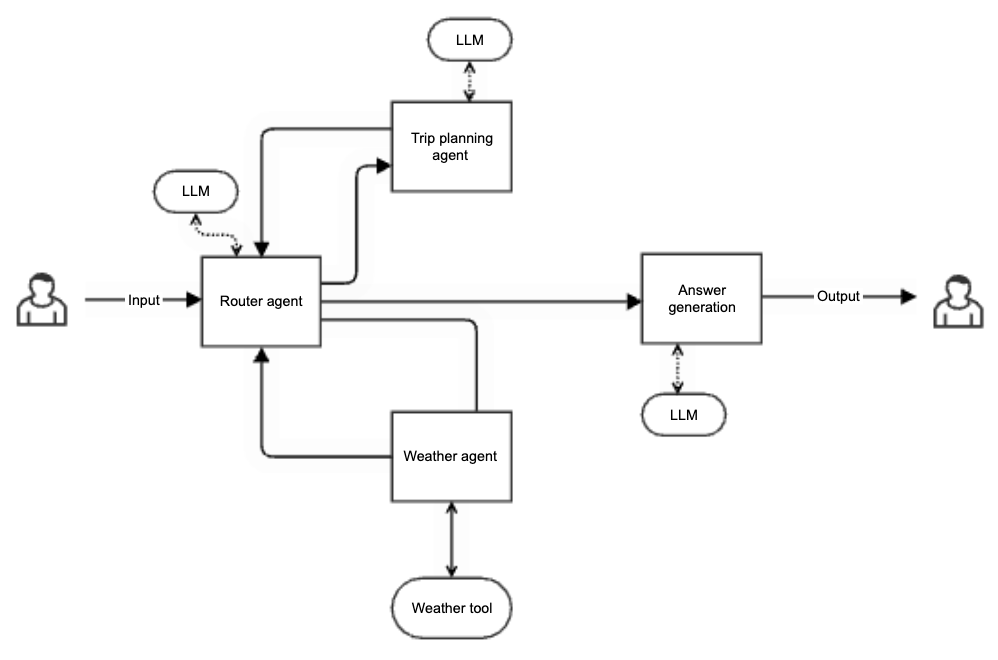
The following image illustrates a multi-agent orchestrator for planning trip. It gets a user request for a trip in a specific location and dates, and plans a trip according to the expected weather. The flow contains:
A router agent that receives the user request and sends it to the relevant sub-agent. It also receives the answers from the agents and routes those to the relevant next steps.
A weather agent that receives aclocation and date and uses a weather tool to return the expected weather in that location.
A trip planning agent that receives a location and expected weather and plans a trip accordingly (using a web search).
A response agent that receives all the information and generates an answer.
Usage#
Example of creating a cycle where after the evaluator the choice step determines whether to cycle to the generator or continue forward to post_process and respond:
graph.to("generator").to("evaluator").to("choice").cycle_to(["generator"]).to(
    "post_process"
).respond()
As an alternative to the choice step, you can implement select_outlets in the evaluator step. See the usage in Prevent infinite loops.
Iteration tracking is automatic, you do not need to add counters manually in the step code. The default number of iterations is 100.
If you set max_iterations in set_topology and in add_step, the value in add_step takes precedence.
Important
If stop conditions (
max_iterations) are misconfigured, cycles can lead to an infinite execution of graph steps.Rerunning steps in a loop can cause unexpected compute spikes and higher costs.
Step failures inside a cycle could repeat continuously, amplifying errors. Any of these issues make graph execution harder to debug and monitor, and increase the risk of resource exhaustion (workers, memory, execution slots).
When a RuntimeError is raised:
If you provided an error handler, the event invokes the error handler
If you did not provide an error handler, the error is raised to the client A typical error is
RuntimeError(f"Max iterations exceeded in step '{self.name}' for event {event.id}").
Example#
# Define the function
function = project.set_function(
    name="cyclic-function",
    func="cyclic.py",
    kind="serving",
    image="mlrun/mlrun",
)
# Define the graph (global cap applies unless overridden per-step)
graph = function.set_topology(
    "flow", engine="async", allow_cyclic=True, max_iterations=100
)
graph.to(name="preprocess", class_name="Processor").to(
    name="generator", class_name="Generator", after="preprocess", max_iterations=30
).to(name="evaluator", class_name="Evaluator", after="generator").to(
    name="evaluation-loop",
    class_name="ChoiceHandler",
    cycle_to=["generator"],
    after="evaluator",
).to(
    name="output", handler="responder", after="evaluation-loop"
).respond()

# Adding error handler to the graph
graph.error_handler(class_name="HandleError")

# Mock server
mock = graph.to_mock_server()
mock.test("/", body={...})

# Kubernetes deployment
function.deploy()
function.invoke("/", body={...})
Prevent infinite loops#
To ensure that your graph does not become infinite, use one of the following two approaches:
Extend an existing step by implementing
select_outletsto explicitly control the flow and prevent cycles. Example:
class MyStep:
    def do(self, event):
        # Process the event
        ...
        return event

    def select_outlets(self, event):
        if event["should_continue"]:
            return ["continue"]
        return ["stop"]
Implement a custom step that inherits from
Choice. Override theselect_outletsmethod to control which outlets are selected at runtime. Example:
import storey


class MyChoiceStep(storey.Choice):
    def select_outlets(self, event):
        if event["should_continue"]:
            return ["continue"]
        return ["stop"]
The list returned by select_outlets must include only valid step names that follow the current step in the graph flow. If the current step is the responder, use Complete as the outlet name to exit the graph and return the response.
Serving function using Kafka queue and serving child function#
Queues accept data from one or more source steps and publish to one or more output steps. You can use them to send events from one part of a graph to another and to decouple the processing of those parts.
graph = fn_serving.set_topology("flow", engine="async")
fn_child = fn_serving.add_child_function("nuclio-log-ds", "nuclio_log_dataset.py", "mlrun/mlrun")

graph.to(name="PrintEvent", handler="print_event").to(
    name="ExtendEvent",class_name="storey.Extend", _fn='({"extend": "something"})').to(
    name="PrintExEvent", handler="print_event").to(
    ">>", "OutputStream", path=topic_out, kafka_brokers=brokers).to(
    name="Log-ds", function="log-ds",handler="save_record").to(
    name="PrintEventLog", handler="print_event_log", function="log-ds")

graph.plot(rankdir="LR")

addr_serving = fn_serving.deploy()
events = [{"int": 2, "x2": 2 * 2} ]
payload = {"records": events}
result = fn_serving.invoke("", body=payload)
Currently, queues support Iguazio V3IO and Kafka streams. See more about Kafka in Kafka stream example.